
Installation
User guide [post_title]
Coming soon
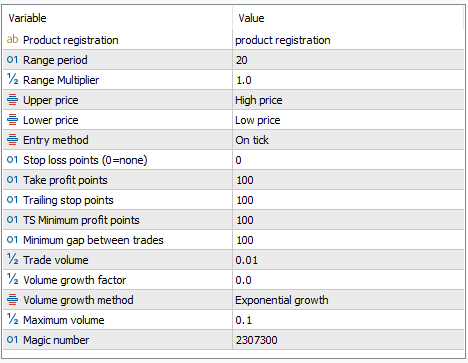
Product Registration
This code is assigned based on your account number. Go to the registration codes page and enter your valid account number to obtain the registration code. There is more information on the registration codes page to explain how to get and use the registration code.
Range Period
This is the period (number of bars or candles) used to generate the regression range.
Range Multiplier
When the range is identified use this factor to increase or decrease the width of the range. A multiplier of 1 is the default range size.
Upper Price
Lower Price
Specifies the price used to calculate the upper range and lower range limits. In this way it is possible to use a single price to calculate both limits (such as close price for both) or to adjust settings to use something like the high price for the upper limit and low price for the lower limit
Entry Method
There are several methods of entry based on price action. These entries are subject to other restrictions such as minimum distance between trades.
- On Tick
A trade is opened as soon as the price reaches the range limit - On Bar Close
A trade is only opened when a bar closes outside the range limit - On Confirmation Bar Close
A trade is only opened when a bar has closed outside the range limit and a subsequent bar closes inside the range limit
Stop Loss Points
The stop loss applied to each trade when it is opened. This is called initial because it can easily change if a trailing stop is used.
Take Profit Points
When the trade is placed a take profit is set at this number of points. If subsequent trades are opened the take profit for all is set such that all trades can be closed at the same price with the specified number of take profit points for each trade.
Trailing stop points
This is the distance that the trailing stop price is behind the best market price achieved since the trade was opened.
TS Minimum profit points
When applying a trailing stop the stop loss price must be better than the position opening price by this number of points. It is a way of setting the minimum profit but does not alow for other charges such as swap.
Minimum gap between trades
this EA can place multiple trades if the entry conditions are met. To avoid placing multiple trades too close together when the market is fluctuating set a value here. Trades in the same direction will not be placed closer than this distance away from each other.
Trade volume
The initial volume for the first trade placed. Subsequent trades will scale according to the other inputs
Volume growth factor
This is a multiplier used to increase trade size when a second or subsequent trade is placed. It is a martingale style approach. Set this to 0 for no increase in trade size.
Volume Growth Method
Specifies how the volume growth is applied when there are multiple trades open in the same direction. If growth factor is zero there is no volume growth. Using volume growth introduces additional risk. For all calculations the calculated volume is rounded down to the nearest allowed volume for the symbol.
- Exponential Growth – For the second and subsequent trades opened the size of the trade is calculated exponentially as
(initial volume)*(1+growth factor)(number of trades) - Linear Multiple – calculated as
initial_volume*(1+(growth_factor*number_of_trades)) - Additive lot count – calculated as
initial_volume+(growth_factor*number_of_trades)
Maximum volume
When using scaling for subsequent trades use this to set the maximum size for a single trade.
Magic number
The magic number is used to identify trades made by this expert. The trades are identified by a combination of the symbol and magic number. If you are running multiple EAs in your account or even the same EA on the same currency but with different settings or timeframe be sure to use different magic numbers.